Two designs. One task. See which one people can finish.
DesignIQ sends simulated people with different eyesight, speed and patience through both versions of your screen. It shows where they look, what they miss, where they give up and what to change.
Sample: two sign-up pages, task “Create an account”. One simulated person at a time, at real speed.
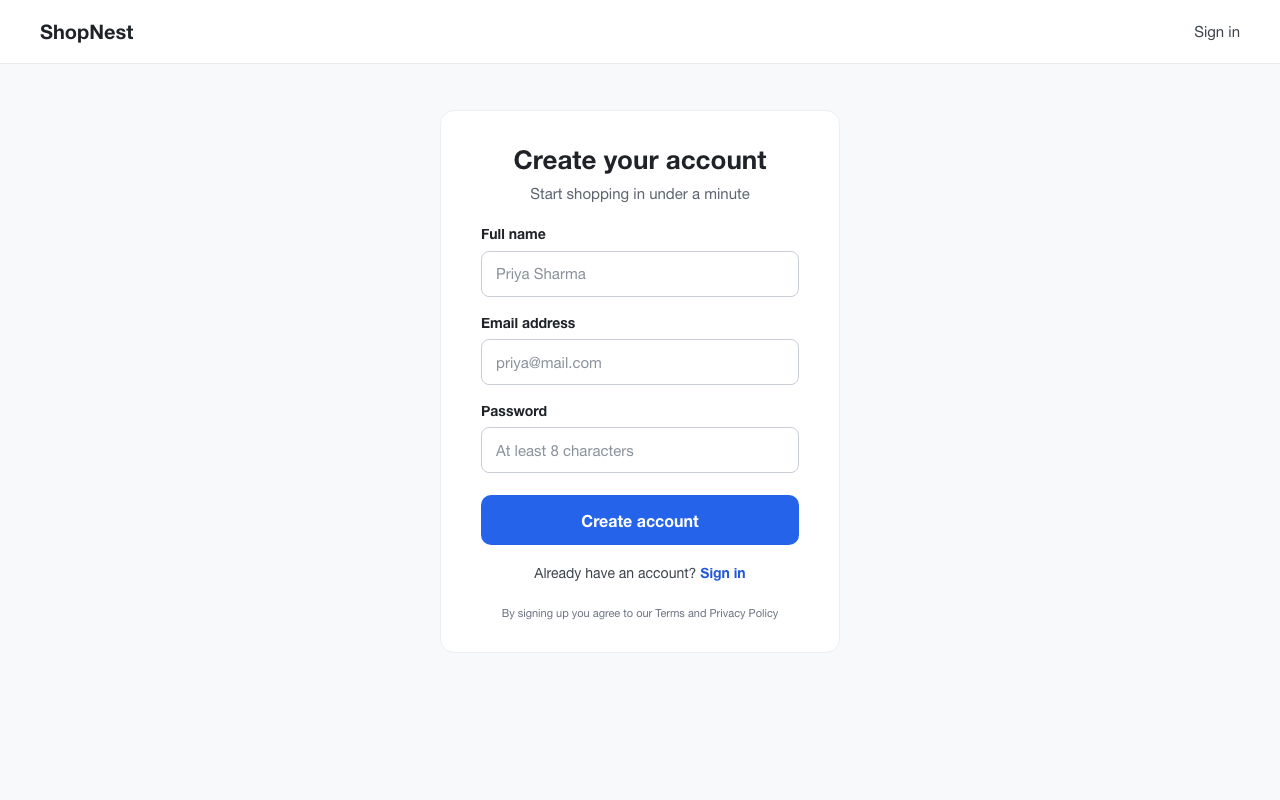
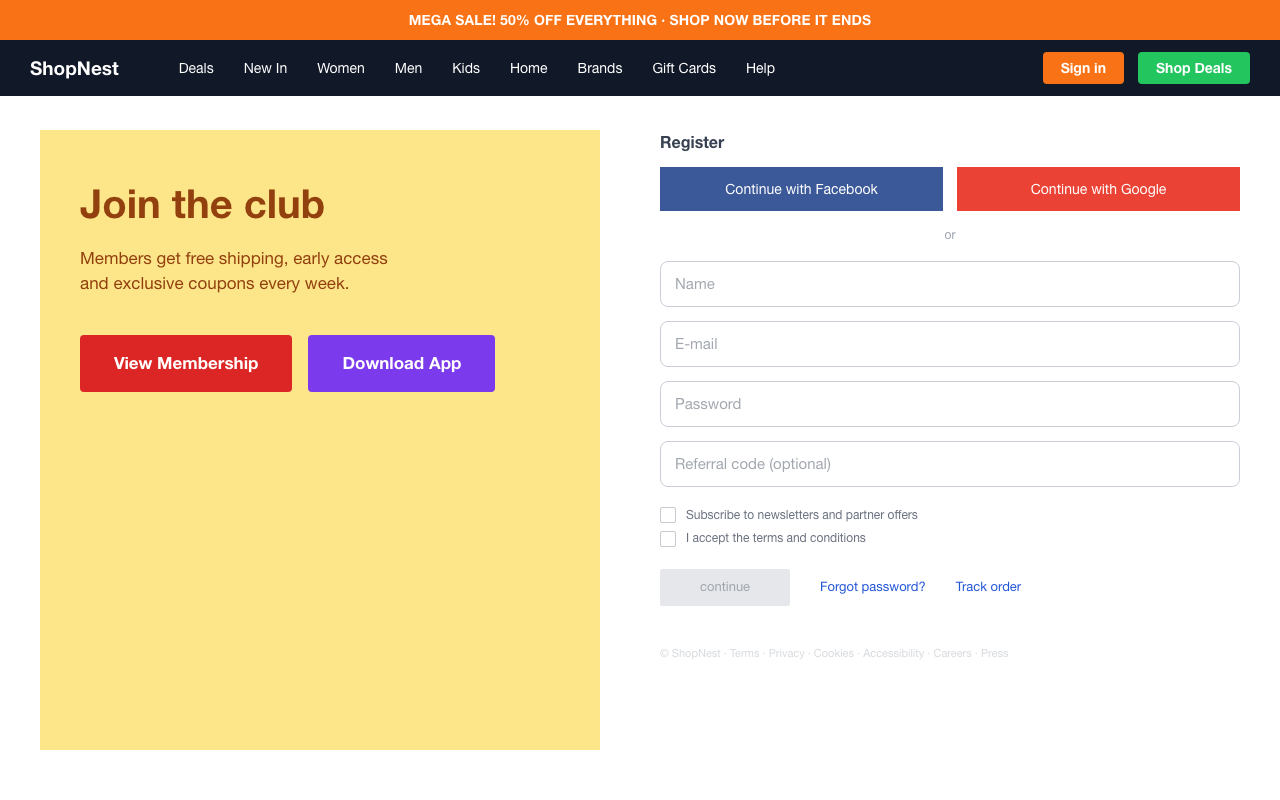
A: 1 text field “Priya Sharma”, 2 text field “priya@mail.com”, 3 text field “At least 8 characters”, 4 button “Create account”. Finished in 16.3 s. B: 1 text field “Name”, 2 text field “E-mail”, 3 text field “Password” (not noticed), 4 text “Members get free shipping, early access and exclusive coupons every week.”, 5 button “Continue with Facebook”, 6 link “Deals”, 7 text “or”, 8 button “View Membership”, 9 link “Gift Cards”, 10 button “Sign in”, 11 link “Accessibility”, 12 link “Forgot password?”, 13 link “Home”, 14 link “Men”, 15 button “continue”, 16 link “ShopNest”, 17 button “Continue with Google”, 18 text field “Name”, 19 text “MEGA SALE! 50% OFF EVERYTHING - SHOP NOW BEFORE IT ENDS”, 20 button “Shop Deals”, 21 link “Track order”, 22 link “Help”, 23 text field “Referral code (optional)”, 24 checkbox “I accept the terms and conditions”, 25 button “Download App”, 26 text field “E-mail”, 27 text field “Password” (not noticed), 28 link “ShopNest”, 29 link “Brands”. Gave up on the text field “Password”: too faint: contrast 1.59:1, first-time visitors need 3:1.
How it works
- 1
Add two versions
Upload two screenshots, or select two frames in Figma. A version can be one screen or a whole flow of up to eight.
- 2
Describe the task
Say what people should do, like “Create an account”. DesignIQ reads every element on the screen and works out the steps.
- 3
See who finishes
Hundreds of simulated people try both versions. You get the version more of them finish, where the rest gave up, and what to fix.
What you get
In the sample, 100% of people finished on version A and 59% on B. Every spot where people gave up comes with the measured cause and a fix.
- B Version B
- 1Button “continue”
68 of 400 people gave up here (17%), mostly older adults. Too faint: contrast 1.59:1, older adults need 4.5:1.
Raise the contrast of the button “continue” from 1.59:1 to at least 4.5:1.
- 2Text field “Password”
34 of 400 people gave up here (9%), mostly older adults. Too faint: contrast 1.59:1, older adults need 4.5:1.
Raise the contrast of the text field “Password” from 1.59:1 to at least 4.5:1.
- 3Text field “E-mail”
32 of 400 people gave up here (8%), mostly older adults. Too faint: contrast 1.64:1, older adults need 4.5:1.
Raise the contrast of the text field “E-mail” from 1.64:1 to at least 4.5:1.
Who tries your design
Four kinds of people, each with published settings. Every test reruns them 50 times with the settings nudged by up to 20%, so one lucky draw can’t decide the result.
First-time visitor
New to the site. Reads labels and needs normal contrast.
- Needs contrast
- 3:1
- Smallest target
- 24 px
- Patience
- 8 looks
- Remembers layout
- 0%
Returning customer
Knows the layout and often goes straight to the right place.
- Needs contrast
- 3:1
- Smallest target
- 24 px
- Patience
- 10 looks
- Remembers layout
- 60%
Older adult
Reads slowly and needs strong contrast and large targets.
- Needs contrast
- 4.5:1
- Smallest target
- 44 px
- Patience
- 8 looks
- Remembers layout
- 0%
Power user
Fast and experienced. Copes with dense or faint layouts.
- Needs contrast
- 2.5:1
- Smallest target
- 16 px
- Patience
- 12 looks
- Remembers layout
- 20%
What it can and can’t tell you
It tells you
- Which version more people can finish
- Where they give up, and why, measured from the pixels
- Which fix helps the most people
- How each kind of person fares, screen by screen
It doesn’t tell you
- Whether people want what you’re offering
- How price, trust or wording change their minds
- How your own audience differs from the four personas
- What a live A/B test would show. It tells you which versions deserve one
We are checking its predictions against real people. See the validation study.
Test your next design before you ship it.
Two screenshots and a sentence. No account needed.